


Best 5 Software to Record Mouse and Keyboard to Repeat Actions
August 4, 2025
Macro Recorder for Chrome — Automate mouse and keyboard actions on any Web Page
April 1, 2026Best free Auto Clicker [Chrome Extension]

Auto Clicker Pro — The Most Powerful Free Auto Clicker for Chrome
Auto Clicker Pro lets you automate repetitive mouse clicks anywhere in your browser. Whether you’re playing idle games, testing web apps, or automating workflows — just set a position, configure the interval, and let it click for you. Unlike basic auto clickers, this extension dispatches the full browser event chain (PointerEvents + MouseEvents), making it compatible with HTML5 games, Canvas elements, and modern web applications that other tools can’t handle.
➡ Install Auto Clicker Pro — Free from the Chrome Web Store
Works on Chrome, Edge, Brave, Opera and all Chromium-based browsers. No signup required.
✅ Features
🎯 Multi-Point Clicking Set multiple click positions and cycle through them in sequence. Perfect for games and complex automation workflows. Free version supports up to 3 points, Pro unlocks unlimited.
🎮 HTML5 Game Support Full PointerEvent + MouseEvent chain simulation. Works with Canvas games, WebGL apps, and modern HTML5 game engines that other auto clickers can’t handle.
🎲 Randomized Intervals Add ±30% randomness to click intervals for natural, human-like clicking patterns. Enable it with a single checkbox.
📅 Scheduler Schedule auto-clicking sessions with precise start and stop times. Set it and forget it — a live countdown runs in the background.
⌨️ Keyboard Shortcuts Start with Ctrl+Q and stop with Ctrl+M — no need to open the popup. Shortcuts are fully customizable from chrome://extensions/shortcuts.
📊 Live Status Overlay When auto-clicking starts, the popup closes automatically and a floating overlay appears on the page showing the real-time click counter and total progress. The overlay persists even if the page navigates.
🖱️ Click Types Choose between left click, double click, and right click. Each type dispatches the full browser event chain for maximum compatibility.
📍 Live Coordinate Tracking See X/Y coordinates update in real-time as you move your mouse during position selection. Pixel-perfect precision.
🔒 Privacy First No data collection. No analytics. No server calls. Everything runs 100% locally in your browser. Your clicks, your business.
📄 How to Use
Step 1 — Set Your Click Position
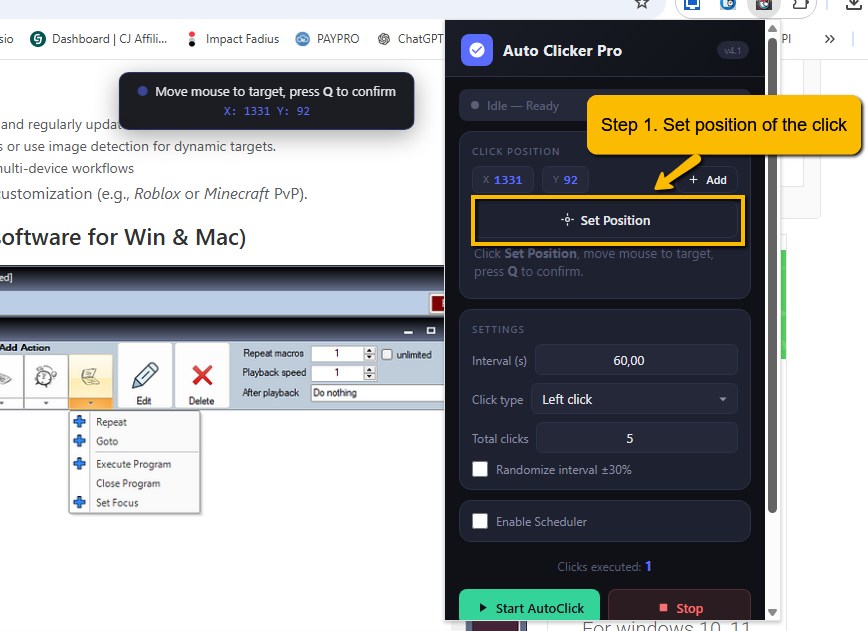
Open the extension popup and click Set Position. Move your mouse to the target area on the page — you’ll see live X/Y coordinates updating in real-time. Press Q to confirm the position. You can add multiple positions by clicking Add after each one.
Step 2 — Configure & Start
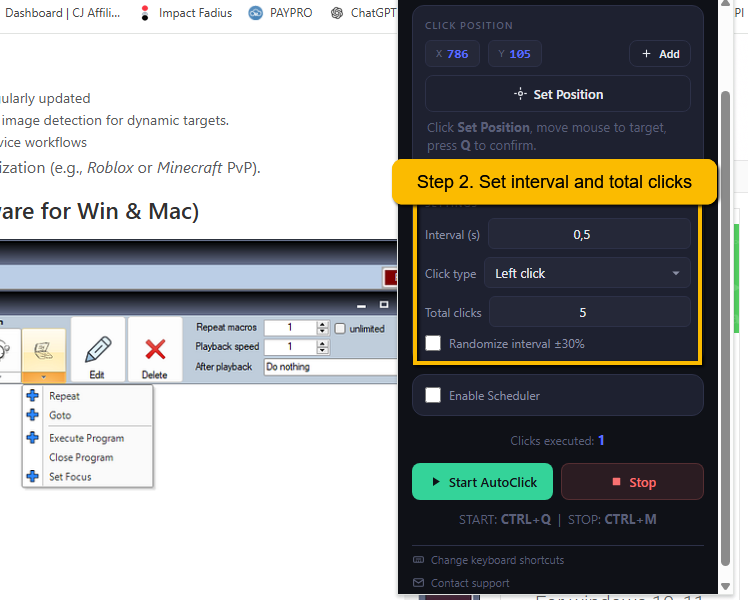
Set the click interval (in seconds), choose the click type (left, double, or right), and the total number of clicks. Optionally enable Randomize interval ±30% for natural-looking patterns. Press Start — the popup closes automatically and clicking begins immediately on the page.
Step 3 — Monitor & Stop
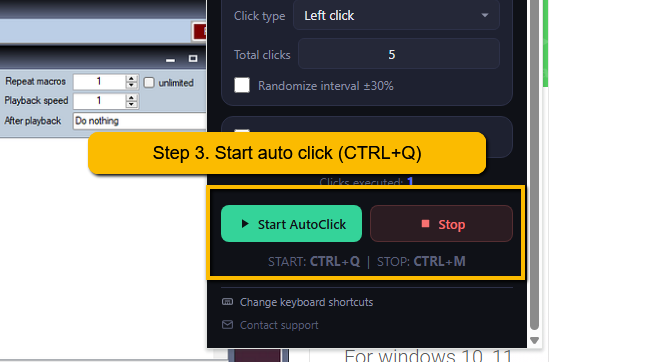
A live overlay appears in the bottom-right corner of the page, showing the real-time click counter (e.g. 47 / 100 clicks) and a reminder to press Ctrl+M to stop. When the auto-clicker stops (either manually or when all clicks are completed), an “Auto Clicker Stopped” notification appears briefly.
🎬 Video Tutorial
Watch a complete walkthrough of Auto Clicker Pro — from installation to automating clicks on HTML5 games
⚡ Free vs Pro
| Feature | Free | ⭐ Pro |
|---|---|---|
| Click interval | Min 0.5 seconds | Down to 0.01s |
| Total clicks | Max 100 | Unlimited |
| Multi-point positions | Max 3 | Unlimited |
| Randomized intervals | ✔ | ✔ |
| Scheduler | ✔ | ✔ |
| Keyboard shortcuts | ✔ | ✔ |
| HTML5 game support | ✔ | ✔ |
| Live status overlay | ✔ | ✔ |
| Click types (left/double/right) | ✔ | ✔ |
➡ Get Started Free — Install from Chrome Web Store
❓ Frequently Asked Questions
Does it work on HTML5 games and Canvas elements?
Yes! Auto Clicker Pro dispatches the full event chain including PointerEvents (pointermove, pointerdown, pointerup) and MouseEvents. This makes it compatible with modern HTML5 game engines, Canvas-based apps, and WebGL applications that other auto clickers can’t handle.
Why does the popup close when I press Start?
This is by design. When the popup is open, it captures browser focus, which prevents clicks from reaching the target page (especially in games). Closing the popup ensures clicks are dispatched directly to the page. A live overlay appears on the page showing real-time progress instead.
How do I stop the auto clicker?
Press Ctrl+M at any time, or open the popup and click Stop. A “Auto Clicker Stopped” notification will briefly appear on the page to confirm. The auto clicker also stops automatically when the configured number of clicks is reached.
What’s the difference between Free and Pro?
The free version includes all core features but limits the minimum interval to 0.5 seconds, maximum clicks to 100, and multi-point positions to 3. The Pro version removes all limits — intervals as fast as 0.01s, unlimited clicks, and unlimited positions.
Does it collect any data?
No. Auto Clicker Pro runs entirely in your browser. It makes zero network requests, collects no analytics, and stores all settings locally using Chrome’s storage API. What browsers are supported? Auto Clicker Pro works on all Chromium-based browsers: Google Chrome, Microsoft Edge, Brave, Opera, Vivaldi, and Arc.
⬇ Download Auto Clicker Pro
Free to install. No account needed. Works on every website. Start automating your browser clicks in seconds. Go to Auto Clicker PRO official webpage for more details, support or for installing the extension for free.
🚀 Need More Than Auto Clicking?
If you need full macro recording beyond simple auto-clicking, MouseKeyRecorder Advanced is the complete solution for desktop automation. Record and replay complex sequences of mouse movements, clicks, keyboard inputs, and delays — perfect for repetitive desktop tasks, testing workflows, data entry, and advanced automation that goes beyond what a browser extension can do. Key features:
🖱️ Mouse Recording — Record clicks, movements, drags, and scrolls
⌨️ Keyboard Macros — Capture keystrokes and text input sequences
🔄 Loop & Repeat — Replay macros any number of times or infinitely
⏱️ Custom Delays — Fine-tune timing between actions
💾 Save & Load — Save your macros to reuse anytime


